

In recent weeks I have been visiting several companies where employees are still working on a hybrid model in order to limit their potential exposure to Covid-19. Hybrid workers spend part of their time homeworking, coming into company premises only for specific meetings or for tasks that are not possible to complete from home.
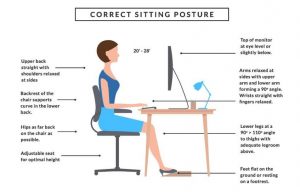
Due to the mobile nature of hybrid working, employees are normally using laptops and may often ‘hot desk’ at an available workstation during the periods they come into the company premises. With laptop users in particular, I have seen a common hazard arising in several workplaces whereby laptops are set up at workstations in a position far too low for the user to operate them comfortably. Working from a laptop that has been set up too low causes the user to adopt a poor posture whilst sitting at their desk, and, over time, this can cause aches and pains in the neck, shoulders and back.
In these cases, the laptop needs to be positioned so that the top of the screen is level with, or slightly below, the user’s eyes whilst they are sitting at their workstation, and the simplest way of achieving this is providing an adjustable laptop riser, which can help elevate the screen to a more appropriate height. This is not the only solution, and there are number of different methods to alleviate the issue which can be explored with the employee to ensure their workstation is set up to allow them to work comfortably.
The Health and Safety (Display Screen Equipment) Regulations 1992 requires employers to protect their employees from potential risks associated with the use of display screen equipment, including PCs, laptops, tablets and smartphones. The regulations deem an individual to be a ‘DSE user’ if they operate display screen equipment for continuous periods of an hour or more.
The law requires that employers must complete workstation assessments for DSE Users to ensure that the DSE equipment, the desk, chair and other elements of the working space are set up correctly, allowing the employee to work comfortably and without the risk of developing musculoskeletal problems, fatigue or eye strain. They should also provide DSE Users opportunities to take breaks from their workstations, possibly by completing different work tasks, where possible. Training and information should be provided to all DSE Users so they know how to use their equipment properly, including any associated software packages. Finally, where DSE Users make a request, employers are legally obliged to provide free eyesight tests.
The law doesn’t just apply to those individuals working from fixed workstations; it is applied equally to mobile workers, homeworkers and those who are ‘hot-desking’.
Some excellent advice and guidance on completing workstation assessments, training requirements, and further details regarding eyesight tests can be found on the HSE website.
For any further advice on DSE Assessments, or to book an assessment with one of our consultants, please feel free to contact MBO Safety Services Limited on 08000 842 297 or info@mbo.ltd